Remember the 3D craze? The Nintendo 3DS, 3D TV, 3D cinema; it was a new, exciting technology that some expected would go mainstream one day. Then the dream just sorta died. People don’t talk about it much these days; except for this wonderful project that takes normal videos and turns them, alchemy-like, into slightly more 3D-looking videos using the Steam Frame.
And let me tell you, it’s actually pretty good.
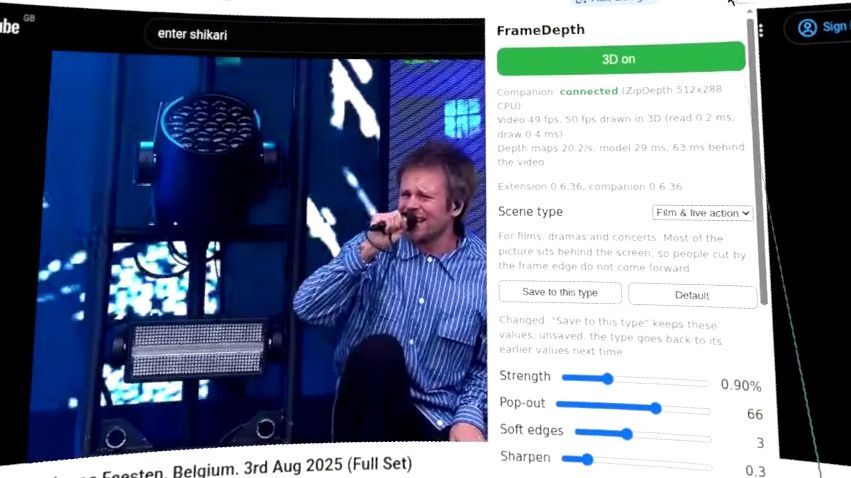
It’s called framedepth, and it’s made by a user going by guix8 on GitHub. It’s a plugin for Chrome that adds a stereoscopic 3D effect to any video when viewed via the browser on the Steam Frame.
It’s surprisingly fun. I’ve been watching live gigs and eating challenges on YouTube and the stereoscopic effect is automatically applied once enabled via the extension. It definitely adds some extra level of immersion to it. Not much, but some. I wouldn’t go as far to say I felt like I was there in the crowd for either spectacle, and maybe I wouldn’t want to be in the firing line of a food challenge, but it’s better than I thought it would be. An ever-so-slightly more engaging way to watch YouTube in VR.
The installation process is a bit more involved than your average Chrome plugin, requiring the Steam Frame to be in developer mode. You need to install Chrome on the Steam Frame, which requires a quick trip to the SteamOS desktop to run the Konsole and install via Flathub (flatpak install com.google.Chrome). Then you have to download framedepth from the GitHub and whack more code in the terminal:
cd ~/Downloads && f=$(ls -v framedepth-*-steamos-arm64.tar.gz | tail -1) && echo “$f” # the newest download
sha256sum -c “$f.sha256” && tar -xzf “$f” && cd “${f%.tar.gz}”
bash install.sh # ~/.local/share/framedepth, user service, extension files
Finally, it needs to be loaded as an extension into Chrome, which also requires developer mode to be enabled for extensions in the browser. Once installed, you can enable the 3D effect and change the settings from a dropdown menu right there in Chrome.
The pop-out slider to the max seems to have the most impact on the 3D effect; the equivalent of cranking the 3DS slider all the way up.
There’s a bunch to play around with here, but it’s worth a go if you have a Steam Frame. If anything, just to rekindle lost excitement for 3D technologies that never managed to win us all over.