
**Storage Solutions for Your Steam Deck: Best SSDs for Enhanced Performance**
Valve currently offers three Steam Deck models: the standard 256GB LCD variant, the 512GB Steam Deck OLED, and a robust 1TB edition of the latter. While all models provide a portable gaming experience, many users seek additional storage, especially for lengthy travel or extensive game libraries. Fortunately, upgrading your Steam Deck’s storage is manageable, primarily through microSD cards or more performant SSDs.
### Current SSD Market Landscape
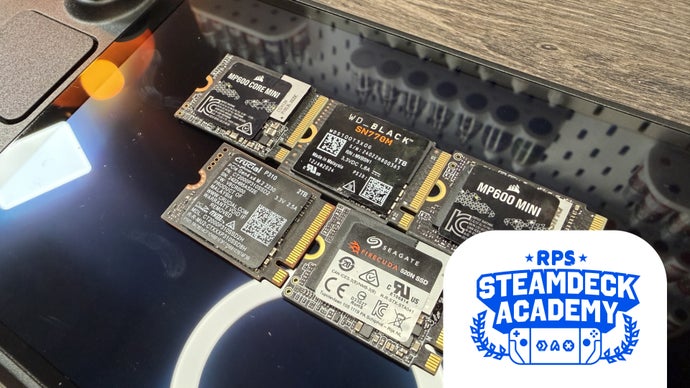
Despite ongoing memory shortages, a variety of SSD options are available. To help consumers avoid the hassle of testing multiple drives, comprehensive benchmarks have identified the best SSDs suitable for enhancing the Steam Deck’s storage capacity.
### Recommended SSDs for Steam Deck
#### 1. **Corsair MP600 Mini**
– **Sizes**: 1TB, 2TB
– **Interface**: PCIe 4.0 x4
– **Sequential Read**: Up to 7000MB/s
– **Sequential Write**: Up to 6200MB/s
– **Warranty**: Five years
– **Pros**:
– Excellent value
– Outstanding random 4K read performance
– Quick game load times
– **Cons**:
– Higher operational temperatures leading to potential throttling
#### 2. **Crucial P310**
– **Sizes**: 1TB, 2TB
– **Interface**: PCIe 4.0 x4
– **Sequential Read**: Up to 7100MB/s
– **Sequential Write**: Up to 6000MB/s
– **Warranty**: Five years
– **Pros**:
– Exceptional value for a 2TB model
– Superior performance
– Good thermal management
– **Cons**:
– Limited availability as production phases out
#### 3. **Seagate FireCuda 520N**
– **Sizes**: 1TB, 2TB
– **Interface**: PCIe 4.0 x4
– **Sequential Read**: Up to 5000MB/s
– **Sequential Write**: Up to 4800MB/s
– **Warranty**: Five years
– **Pros**:
– Outstanding temperatures
– Reliable with solid load times
– Comprehensive data recovery service
– **Cons**:
– Performance similar to the stock SSD
#### 4. **WD Black SN770M**
– **Sizes**: 500GB, 1TB, 2TB
– **Interface**: PCIe 4.0 x4
– **Sequential Read**: Up to 5150MB/s
– **Sequential Write**: Up to 5150MB/s
– **Warranty**: Five years
– **Pros**:
– Readily available
– Fairly rapid load times
– Good for random 4K workloads
– **Cons**:
– Relatively higher cost
– Slightly warmer operation
#### 5. **Corsair MP600 Core Mini**
– **Sizes**: 1TB, 2TB
– **Interface**: PCIe 4.0 x4
– **Sequential Read**: Up to 5000MB/s
– **Sequential Write**: Up to 3800MB/s
– **Warranty**: Five years
– **Pros**:
– Incredible value when in stock
– Low operating temperatures
– Acceptable load times
– **Cons**:
– Performance dips under certain conditions
– Inconsistent availability
### Compatibility and Installation
The Steam Deck utilizes an M.2 2230 slot for storage upgrades, supporting PCIe 3.0 speeds. This means although PCIe 4.0 drives are compatible, their speeds will be capped by the Steam Deck’s interface limitations. Installation of an SSD in the Steam Deck is straightforward. Users need to power down the device, access the internals after unscrewing the back panel, and replace the SSD. Detailed guides are available for those unfamiliar with the process.
### Conclusion
Upgrading your Steam Deck’s storage can significantly enhance your gaming experience, especially for those with extensive libraries or who frequently travel. The outlined SSDs provide a range of options balancing performance, cost, and availability to suit various needs. With the right choice, you can ensure your Steam Deck remains a robust portable gaming solution.