# Nvidia’s DLSS 5: The Debate Over Generative AI in Gaming
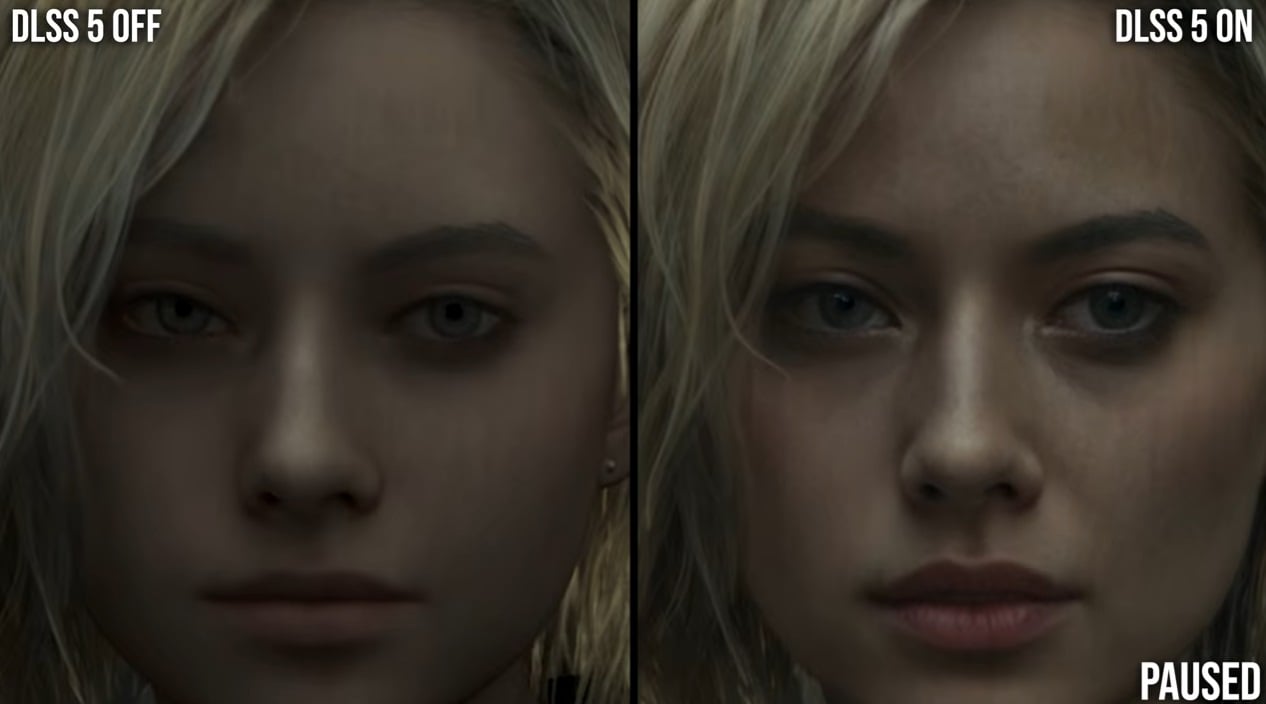
Nvidia has sparked a vigorous discussion within the gaming community after revealing its newest innovation, DLSS 5. The demonstration highlighted generative AI’s role in improving photorealistic lighting within games, but it also raised concerns regarding its impact on character designs, igniting criticism that the technology is effectively “yassifying” the faces of gaming avatars.
## The Response to DLSS 5
Digital Foundry, a well-regarded source recognized for its thorough technology evaluations, had an early look at DLSS 5 and shared a video analysis that recognized the technology’s potential. However, this favorable viewpoint faced significant criticism from the larger online community, which decried the seemingly extreme modifications in character aesthetics.
In a recent YouTube Q&A, Digital Foundry’s founder Richard Leadbetter responded to some of the criticism, acknowledging that the reception of the video was anticipated and that the team could have presented it more effectively. He remarked on the hurried nature of their initial evaluation, saying, “I think we should have taken more time with the material… and I think it would have been prudent to wait to see the reaction from the audience.”
## The Technical Elements of DLSS 5
The heart of the controversy centers around the before-and-after comparisons showcased during the presentation. Viewers were surprised by how generative AI seemingly altered game visuals, especially character designs. A notable example involved a comparison of Grace from *Resident Evil Requiem*, demonstrating a striking difference in her character model after the application of DLSS 5. Leadbetter remarked on the intriguing visual change, stating, “When you first see that shot, it’s quite difficult to argue… which one would you rather play?”
This significant change in appearance not only prompted discussions about artistic intent but also raised ethical questions about the overlap between AI-generated art and human creativity. Team members at Digital Foundry, including Leadbetter and fellow member Oliver Mackenzie, faced adverse reactions, including personal threats.
## Analyzing Gaming Aesthetics and Ethics
The effects of generative AI on character design have spurred calls for more in-depth conversations. Another Digital Foundry member, Alexander Battaglia, provided a contrasting perspective, emphasizing the potential loss of individuality in character models. He voiced his worry that AI technology might excessively normalize appearances, effectively diminishing the uniqueness of individual characters, which poses ethical challenges concerning likeness rights and artistic integrity. Battaglia expressed his unease by stating, “Ethically, I find that very problematic because the actress probably signed off on her likeness to a certain degree.”
The debate illustrates ongoing conflicts between technological advancements and the preservation of artistic expression in gaming. As AI technologies like DLSS 5 grow more common, developers and stakeholders must navigate how to uphold the original visions of creators while leveraging AI to improve visuals.
## Conclusion
Nvidia’s DLSS 5 has certainly demonstrated the potential of generative AI in enhancing gaming graphics but has also unleashed a range of discussions concerning the crucial balance of technology, artistic integrity, and ethical issues in the gaming sector. As with any technological progression, this debate serves as a reminder of the responsibility that accompanies innovation, especially in a domain where creativity and authenticity are highly valued.