
### Metroid Prime 4: The Control Customization Journey
**Summary of Metroid Prime 4: Beyond**
Launched for the Nintendo Switch and Switch 2, *Metroid Prime 4: Beyond* is rapidly attracting attention from both newcomers and seasoned gamers. A lot of players are relishing the return to Samus Aran’s legendary world, although some frustrations arise concerning its control layout, especially regarding the Morph Ball function.
**Control Challenges with Morph Ball**
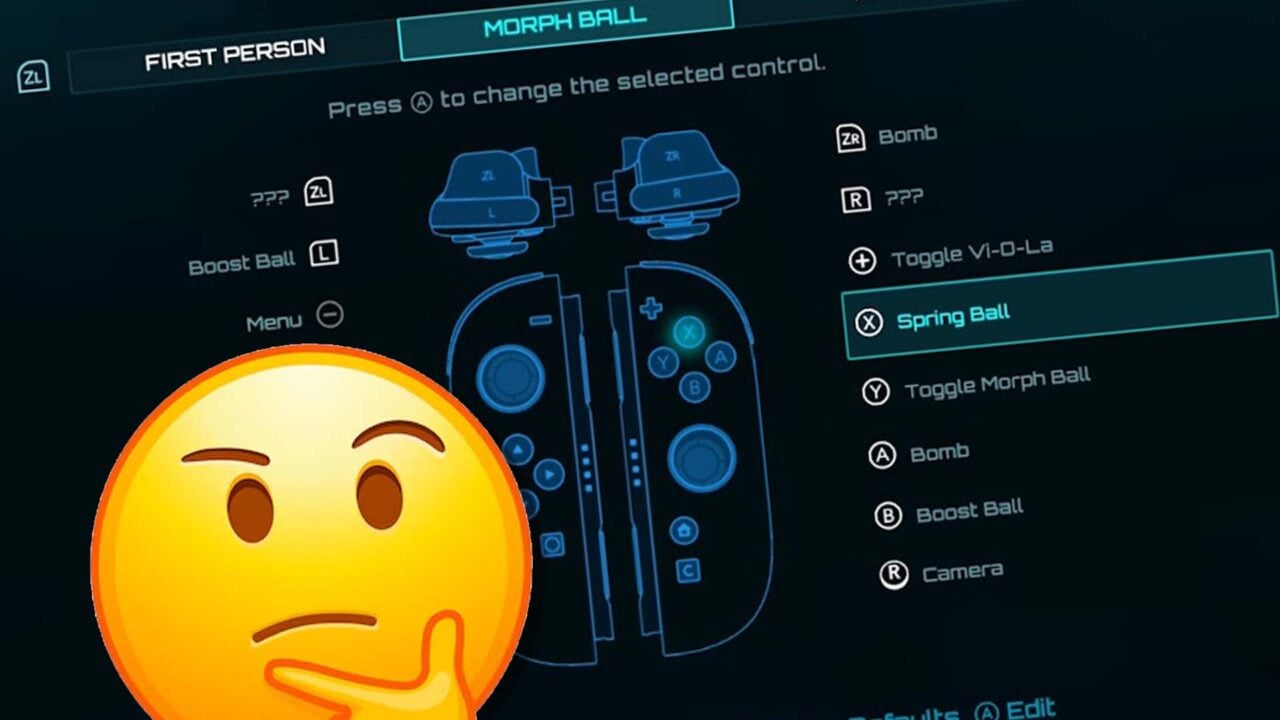
A key issue for gamers involves the default jump button assigned to the Morph Ball, which uses the X button instead of the more expected B button, utilized for jumping while in human form. This lack of consistency in the controls can be unsettling, particularly for those who are not well-acquainted with the series’ earlier titles where similar configurations were adopted.
**Modifying the Controls in Metroid Prime 4**
Fortunately, players can personalize their controls in *Metroid Prime 4*. While it necessitates maneuvering through various menus, the capability to remap controls is a highly appreciated feature. Here’s a guide to altering the Morph Ball jump button:
1. **Pause the Game**: Start by pausing your game to reach the settings menu.
2. **Go to Control Scheme**: Scroll down to the “Control Scheme” section and press the A button.
3. **Morph Ball Settings**: Press ZR to access the Morph Ball control options.
4. **Choose Spring Ball**: Select “Spring Ball” and hit A.
5. **Change Jump Button**: Highlight the slot for the B button and confirm the change.
6. **Address Question Marks**: If the B button slot shows question marks (???), proceed with the next steps.
7. **Advanced Mode Notice**: The game will ask you to enter advanced mode; select “Ok” to continue.
8. **Final Adjustment**: You can now replace the ??? slot (designated for the Spin Ball ability) with your desired option, effectively correcting the initial setup.
This customization method will function similarly on both the Switch and Switch 2 consoles.
**Concluding Remarks**
After reshaping the controls, numerous players have experienced a marked enhancement in their gameplay with the Morph Ball mechanics. While it’s puzzling why such a vital function is somewhat hidden within the game menus, the fact that Nintendo allows control remapping is praiseworthy. Customization can significantly boost player satisfaction, and as players tailor their controls, they can become fully engaged in the thrilling escapades of *Metroid Prime 4: Beyond*.