### New Steam Client Beta Update: Enhancements for SteamOS and Big Picture Mode
There’s a new Steam client beta update out, and for SteamOS devices like the Steam Deck or Steam Machine – or just the Windows client’s Big Picture Mode – it’s a significant one in terms of features.
#### Big Art View for Home Screen
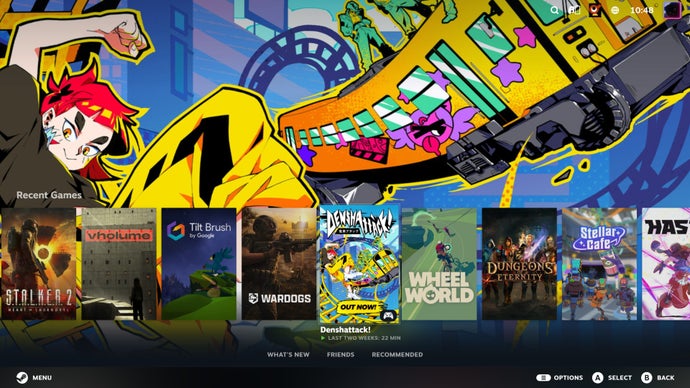
One of the most notable additions is the new “Big Art” view for the home screen. This feature removes the news and store recommendations, allowing for a clearer presentation of each game’s key art by lowering the game carousel. This enhancement is available for both Big Picture Mode and Gaming Mode on the Deck/Machine.
In addition to Big Art, a built-in screensaver feature has been introduced, which by default displays a rotation of game artwork, with the option to include personal screenshots. While some may prefer showcasing humorous glitches or interesting moments captured from games, others might opt for the retro-style bouncing Steam logo, which can create a calming ambiance.
Valve provides options for users to add their own custom screensavers via file directory adjustments, allowing for further personalization.
#### Utility Tweaks for SteamOS
The update brings several practical improvements, especially for SteamOS devices. Most notably, the Compatibility tab in a game’s Properties menu now displays the currently used Proton version directly, without having to navigate through additional sub-options. This streamlined approach is particularly useful for users testing different Proton versions in search of compatibility fixes.
Additionally, a new toggle has been introduced that enables SteamOS to boot into Desktop Mode by default. This feature is essential for users utilizing a Steam Machine as a conventional desktop PC and can save time for Steam Deck users attempting to install non-native software.
#### Conclusion
The update is packed with enhancements that improve usability and accessibility for users on SteamOS devices and Big Picture Mode. These updates are likely to make their way to the stable branch after the beta testing period. Interested users can join the beta by navigating to Settings > Interface > Client Beta Participation on the desktop app or Settings > System > Beta Participation on SteamOS.